














Steam is a special place for many gamers, because it's where they can get games. But, how do you buy games on Steam? Actually, buying games on Steam is very easy, you just need to click once and complete the payment.
However, if you are still unsure about the tutorial on how to buy games on Steam, I will provide a complete tutorial with the images below.
Also Read: 12 Game Trailers at PlayStation State of Play Event May 2024
Steam: Definition, Function, and Purpose

Before we discuss how to buy games on Steam, let's first get acquainted with Steam. In short, Steam is a digital distribution platform managed by Valve Corporation, which has become one of the most popular platforms for gamers around the world. Here's the full explanation:
Definition
Steam is a digital distribution platform used to purchase, download, and manage various types of video games. Founded by Valve Corporation, Steam was originally launched in 2003 and has since grown to become one of the largest gaming platforms in the world.
Through Steam, you can access thousands of game titles from various genres, both from developer famous, such as SEGA, KONAMI, XBOX, etc., as well as developer indie games.
Function
- Game Distribution: Steam serves as a digital store where you can buy and download games. The platform provides various payment options and offers many discounts on games.
- Game Management: Steam makes it easy for you to manage your game collection. With the library feature, you can easily install, update, and delete games.
- Community and Social: Steam has community features to interact with other players. You can join groups, join discussion forums, and read game reviews from other gamers.
- Steam Workshop: This feature is used to create, share and download other Steam user-generated content, such as mods and add-ons for games.
- Steam Cloud: Steam provides a cloud storage service to save your game data, so you can continue playing from another device without losing your previous game progress.
- Achievements and Collections: Steam provides achievements for various games.
Destination
- Ease of Access: Steam aims to provide easy access for gamers to buy, download, and play games legally and conveniently.
- Supporting Game Developers: By providing an easy-to-use platform, Steam helps game developers of all sizes to sell and promote their works to gamers from all over the world.
- Gamer Community: Steam aims to build an active and supportive community of gamers through strong social and community features.
- Innovation and Creativity: Through Steam Workshop, Steam encourages the innovation and creativity of gamers in creating and sharing their own content.
- Security: Steam also focuses on providing a safe gaming experience with an automatic update system and responsive customer support.
With its various features and functions, Steam is not only a game distribution platform, but also an ecosystem that supports and enriches the gaming experience for players around the world.
How to Buy Games on Steam
Okay now we start discussing the main topic, which is how to buy games on Steam. If you have a game in mind on Steam, and it happens to be on sale, you should buy it right away. deh use this tutorial!
1. First, make sure you have a Steam account. If not, please create a Steam account first via this link.
2. If you already have a Steam account, just click on the game you want to buy. Then, you click the Add to Cart. Remember, pay attention to the game information, you don't want to buy only DLC without standard game-her.
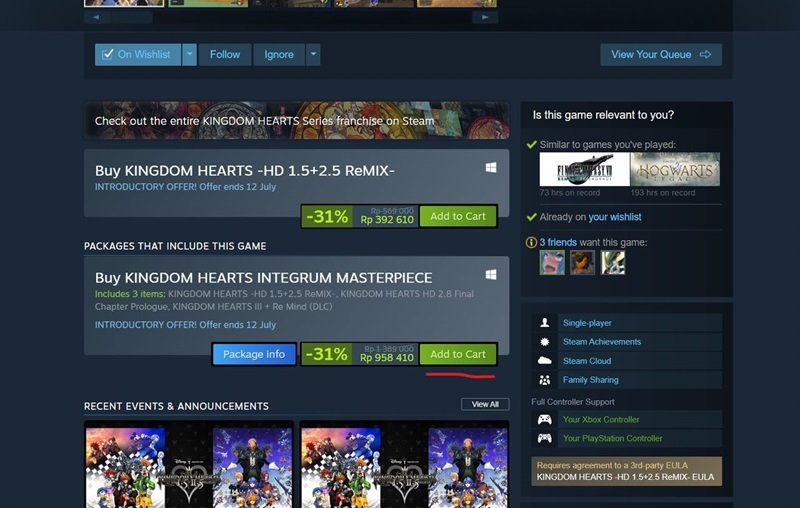
3. After that you can click view my cart.

4. Or you can back and click the Cart in the top right corner.
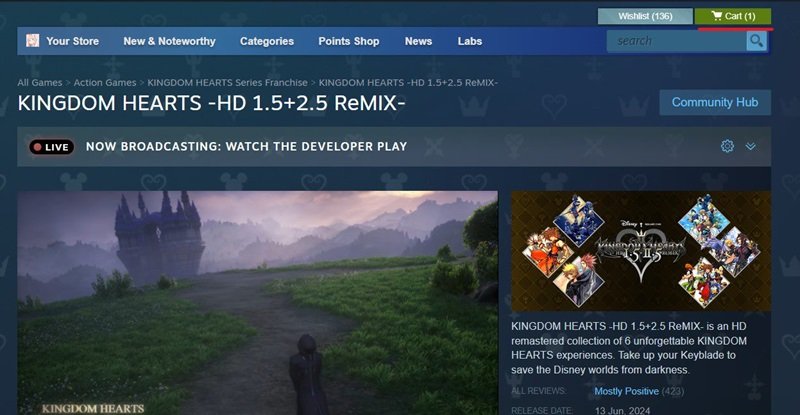
5. Then, you click the Continue Shopping. Now, at this stage, make sure you select the For my account, this means that the Steam game will be logged into your Steam account. After that, continue by clicking Continue to payment.

6. Don't forget to check Agree... then proceed to click Purchase.
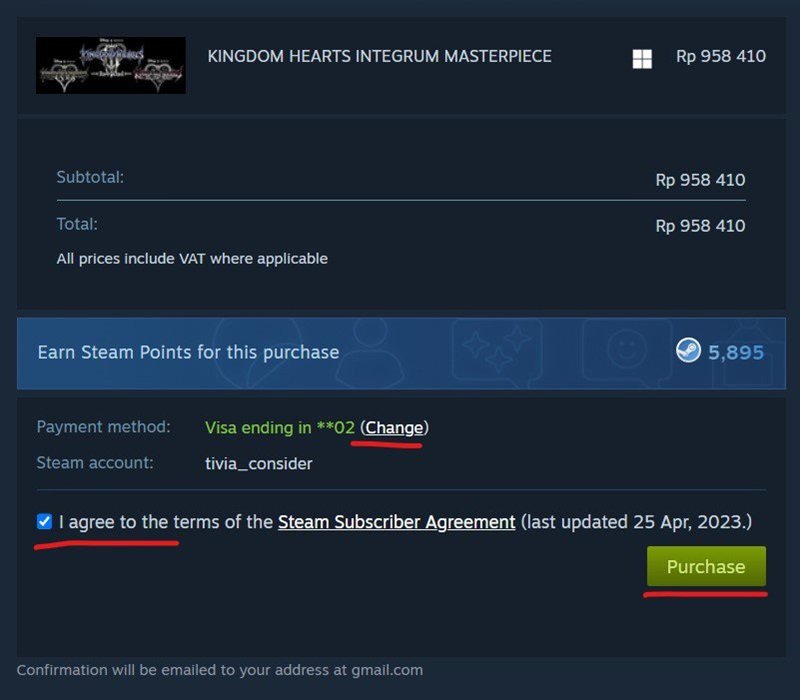
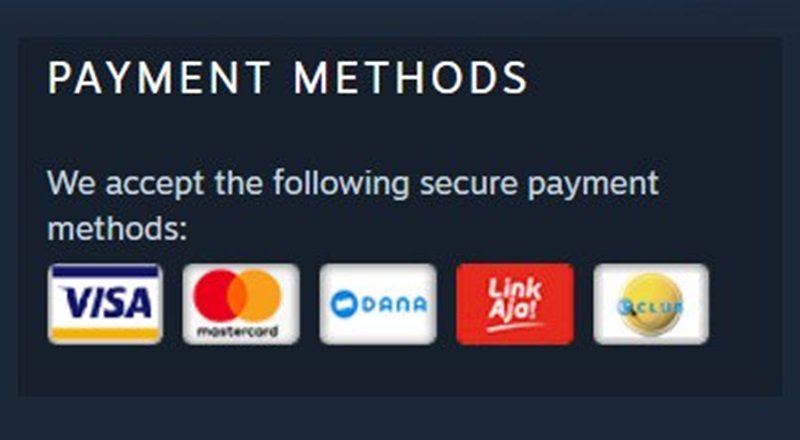
7. You can make payments via credit card, DANA, Link Aja, and more. Just choose according to your preference.
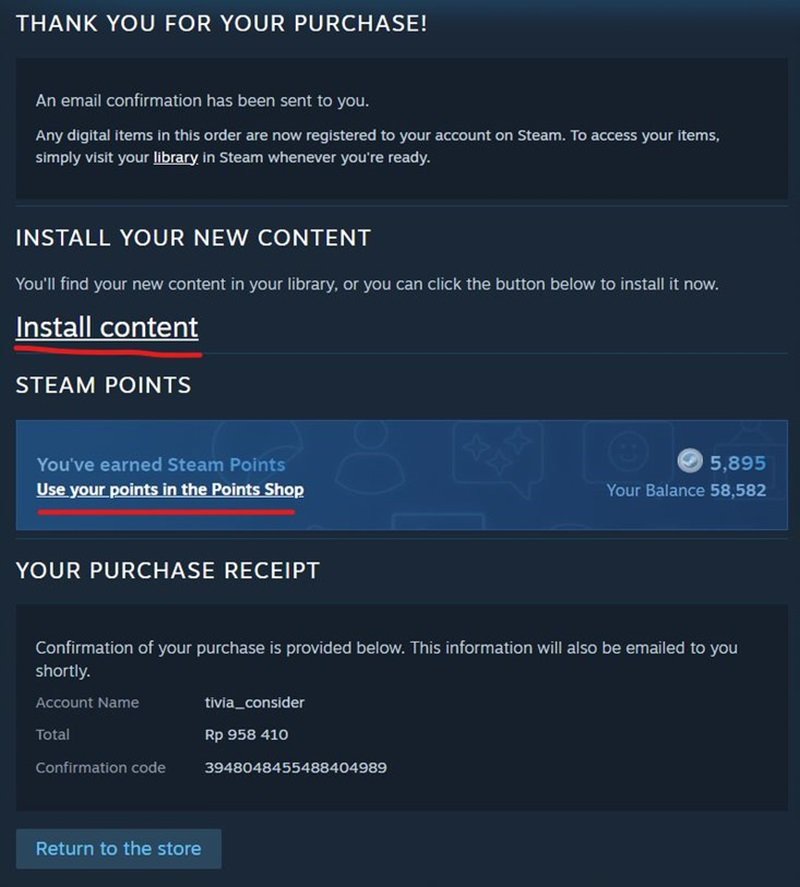
8. If the payment has been completed, you can click Install content. Oh yeah, every purchase will also earn Steam Points that you can later use to buy more games.
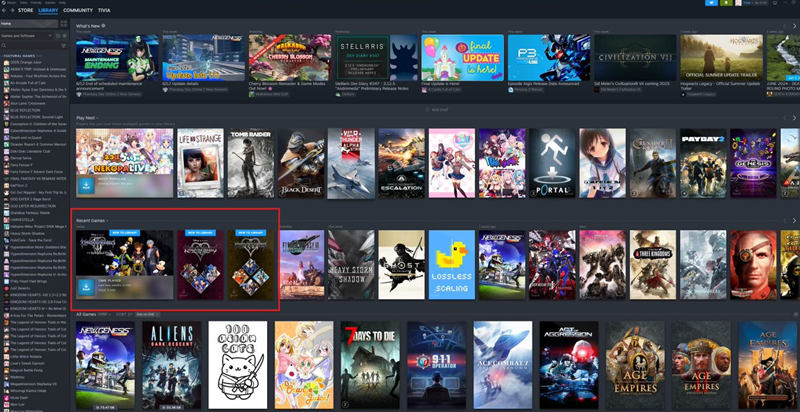
9. When the installation is complete, you can view your latest game in the Steam Library.
How? Just 9 steps to how to buy games on Steam is very easy. You just need to click, no need to think.
Tips for Buying Games on Steam

Although buying games on Steam is easy, there are some tips you can follow when buying games on Steam to still get good games at low prices. Here's how:
1. Take advantage of Discounts and Special Sales
- Steam Sale: Steam often holds discounts such as Steam Summer Sale, Winter Sale, and Autumn Sale. Take advantage of this moment to buy the game you've been eyeing.
- Wishlist: Use the wishlist feature to mark the games you want. Steam will notify you when the game is on sale, so you can buy it at a lower price.
2. Read Reviews and Ratings
- User Review: Before buying, make sure you read reviews from other users. These reviews can give you an idea about the quality and performance of the game.
- Overall Assessment: Also pay attention to the overall rating of the game. Games with a "Very Positive" or "Overwhelmingly Positive" rating are usually very good.
3. Check System Specifications
- Minimums and Recommendations: Make sure your computer meets or exceeds the minimum specifications required by the game. You can find these specifications on the game's product page on Steam.
- Benchmark: If in doubt, look for benchmarks or videos on YouTube to see how the game runs on a system similar to yours.
4. Pay attention to the Game Version
- Standard vs. Deluxe vs. Ultimate: Games on Steam are very varied. Make sure you choose the version that suits your needs and budget.
- DLC (Downloadable Content): Make sure you don't buy DLC without owning the base game. DLC is additional content that requires the base game to be played. Always check the product details before buying.
5. Use Steam Refunds
- Return Policy: Steam has a refund policy to return your purchased game within 14 days, as long as you haven't played it for more than 2 hours. Take advantage of this feature if you're not satisfied with the game you purchased.
6. Take advantage of Steam Bundles
- Bundles: Steam often offers bundles that contain multiple games at a discounted price. This is a good way to get more games for less. However, make sure you're actually interested in all the games in the bundle.
7. Check Platform Compatibility
- Windows, Mac, Linux: Make sure the game you buy is compatible with the operating system you're using. Some games may only be available for certain platforms.
8. Use the Family Sharing Feature
- Family Sharing: If you have family members or friends who also play games, utilize the Family Sharing feature to share your purchased games with them. This can save you the cost of purchasing games for the whole family.
By following the tips above, you can ensure that your game buying experience on Steam becomes more efficient and satisfying. Happy shopping and playing. Try Share your experience for this tutorial on how to buy games on Steam!